Self-Locking Doors and Gates: How to Make Your Home Lock Itself Every Night
Disclosure: This article may contain affiliate links. If you click one and make a purchase, MakeMyHomeMyFortress.com may earn a commission at no extra cost to you. As an Amazon Associate we earn from qualifying purchases.
Quick answer: To make a gate lock itself, pair self-closing hinges with a self-latching (or self-locking) latch and adjust them so the gate closes and catches from any position; California requires exactly this on pool gates, with the latch no lower than 60 inches. For doors, turn on a smart deadbolt's auto-lock, ideally with a door-position sensor so it only locks when the door is actually shut. Then add one nightly routine that locks every smart lock at a set time and notifies you, plus a one-minute walk to check gates, sliders and windows.
Most break-ins we worry about don't involve picks or pry bars. They involve a door someone meant to lock, or a side gate that didn't quite catch. The fix is to stop relying on memory: let hardware close and latch things for you, let a smart lock re-lock itself, and run one short routine every night. Here is how each piece works, where it fails, and a printable checklist at the end.

Step 1: Make gates close and latch on their own
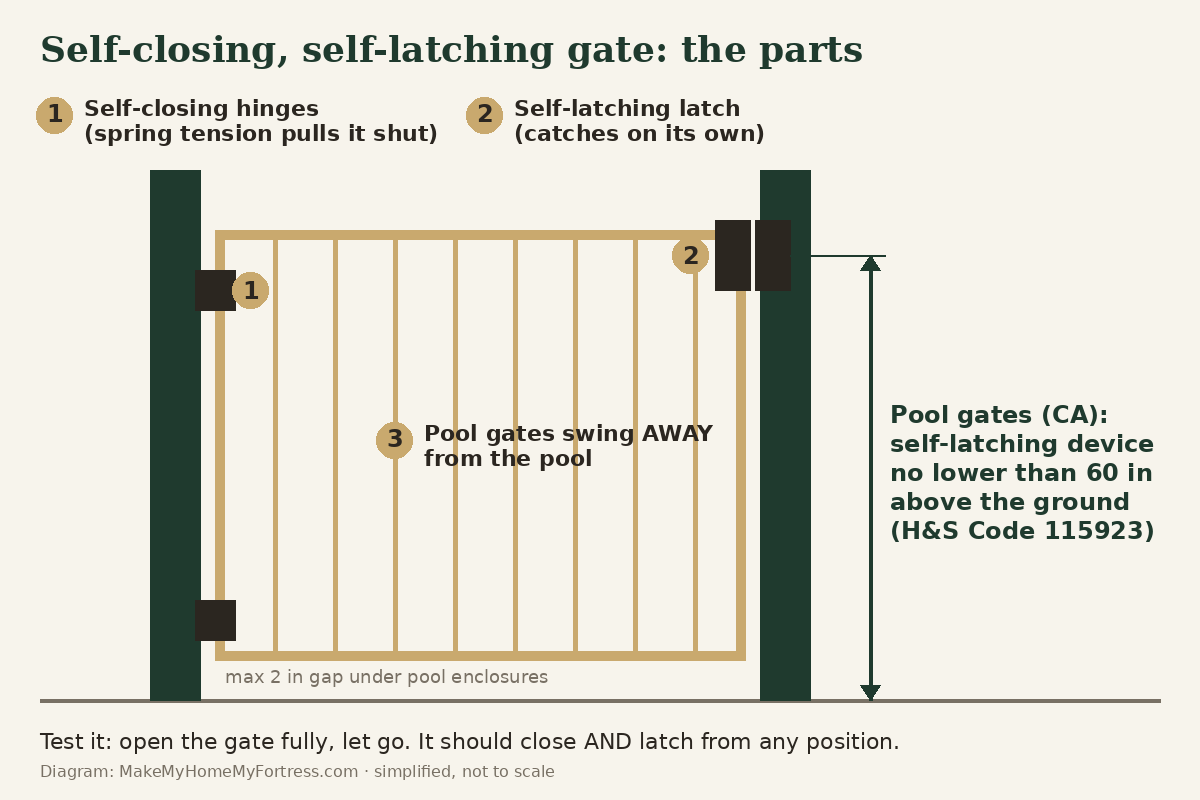
A gate that locks itself needs two separate things, and people often buy only one:
- Self-closing hinges. Spring (or hydraulic) hinges pull the gate shut after you walk through. Most have adjustable tension. Set it so the gate swings closed firmly from fully open, without slamming hard enough to bounce off the latch.
- A self-latching latch. The latch has to catch on its own when the gate arrives. Gravity latches and magnetic latches do this. Some, such as magnetic pool-gate latches, also accept a key so you can lock the gate, which makes it self-locking as well.
- Alignment. Gates sag. If the latch half and the striker are off by even a little, the gate closes but doesn't catch. Re-check after wet winters and after anyone leans on the gate.
One example of a combined kit is the D&D Technologies MagnaLatch Top Pull with TruClose self-closing hinges: a magnetic latch with a lift-to-open knob on top, plus spring hinges. We haven't installed it ourselves; it's listed here because it bundles both halves. Whatever you buy, check the hinge rating against your gate's weight and material.
The test: open the gate all the way and let go. Then open it halfway and let go. Then a few inches. It should close and latch from every position. If it stops short from a small opening, add hinge tension; if it bounces open, lower the tension or fix the alignment.
Pool gates in California: this is the law, not a suggestion
If the gate is part of a pool or spa enclosure, California already requires what this article recommends. Under the Swimming Pool Safety Act, an enclosure's access gates must open away from the pool and be self-closing with a self-latching device placed no lower than 60 inches above the ground; the enclosure must be at least 60 inches tall with no more than 2 inches of clearance at the bottom (Cal. Health & Safety Code 115923). When a permit is pulled for a new or remodeled pool or spa at a single-family home, it needs at least two of seven drowning-prevention features; one option is a self-closing, self-latching device with its release no lower than 54 inches above the floor on house doors that open directly to the pool (Cal. Health & Safety Code 115922, as amended effective Jan. 1, 2025).
Cities and counties can add local amendments, so confirm the details with your building department (in the City of LA, LADBS; elsewhere in LA County, your city or LA County Building & Safety) before you buy hardware for a pool gate. For pool gates, child safety comes first; security is a bonus.
Step 2: Turn on auto-lock for your doors (and understand what it actually does)
Auto-lock on a smart deadbolt throws the bolt for you after a delay or when the door closes. The details differ by brand, and those details matter:
- Timer vs. door sensor. A timer locks a set time after unlocking. A door-position sensor tells the lock whether the door is actually shut. August says that with its DoorSense sensor enabled, auto-lock will not engage while the door reads as open; once it closes, the timer starts, or the lock can relock instantly, and a separate re-lock timer covers the case where you unlock but never open the door (August support, updated Oct. 20, 2021). That's the setup we'd look for: auto-lock that knows the door is closed.
- Scheduled locking. Schlage says its Encode deadbolts (BE489/BE499) and Encode Lever (FE789) can lock at set times on chosen days through the Schlage Home app, and that HomeKit routines are available only on the Encode Plus (Allegion/Schlage knowledge base, checked Nov. 11, 2026). If you want an Apple Home routine, that distinction decides which model you buy.
Locks that offer these features include the Schlage Encode Smart Wi-Fi Deadbolt, the Yale Assure Lock 2 Touch (Wi-Fi) and the August Wi-Fi Smart Lock, which fits over your existing deadbolt. For a side-by-side on whether a smart lock is worth it at all, see Smart Locks vs. Deadbolts.
Where auto-lock fails:
- The door didn't latch. If a door rests against the frame without fully closing, a timer-only lock may extend the bolt into air. That's the main reason to use a door sensor.
- A misaligned bolt. If the bolt rubs the strike, the motor can jam and the lock reports an error. Fix the strike before blaming the electronics; our door reinforcement guide covers strike plates.
- Dead batteries. Turn on low-battery alerts and change batteries on a calendar, not when the lock dies.
- Locking yourself out. Don't use instant auto-lock on a door you step out of without a code, key or phone, such as a back patio door you use to take out trash.
Step 3: Build one nightly "lock everything" routine
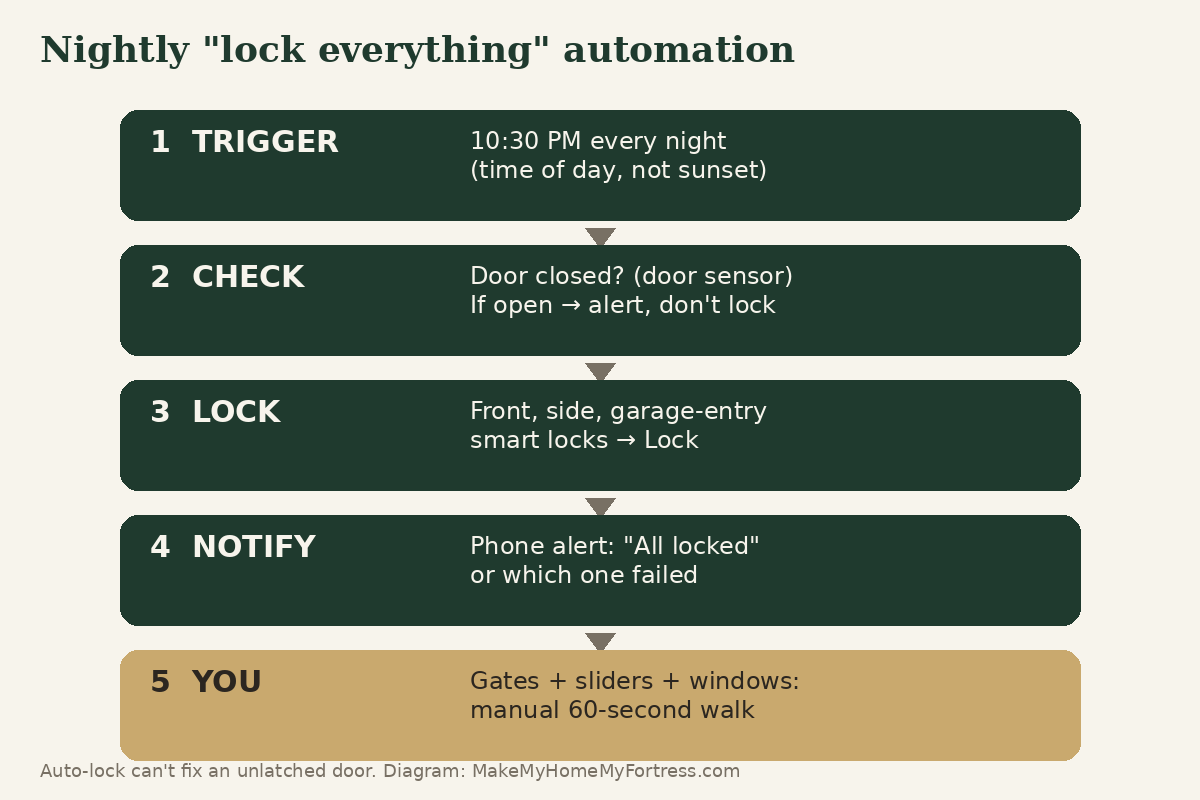
Auto-lock covers the moments you walk through a door. A nightly routine catches everything else: the door a guest unlocked, the garage-entry door, the lock that jammed at 6 PM. In Apple Home, automations need a home hub (an Apple TV or HomePod), and you can trigger them by time of day, by who's home, or by a sensor (Apple Support, "Create scenes and automations with the Home app," checked Nov. 11, 2026). Alexa, Google Home and the lock makers' own apps can do the same thing.
- Pick a fixed time, not sunset. Daylight saving time ended November 1, 2026 (ABC7, Oct. 2026), so a sunset trigger now fires around dinnertime with the family coming and going. Choose a time after the household is usually in for the night, like 10:30 PM.
- Add every smart lock to a single "Good Night" scene: front, side and the door from the garage into the house.
- Turn on notifications for the locks so you see the result. A routine you can't confirm is a routine you'll stop trusting.
- Check that it ran. Some phones ask you to confirm automations that involve locks, especially location-based ones. Look at the lock's activity history the next morning for the first week. If you find it waiting for a tap, use a time-based trigger instead.
- Add what can't lock itself. Gates, sliders and windows still need a quick walk. That's what the checklist below is for. Sliders in particular need a bar or pin; see How to Secure a Sliding Glass Door.
Honest limits
Self-locking hardware removes forgetfulness. It doesn't make a door or gate stronger. A gate latch keeps casual visitors and wandering kids out; it won't stop someone who climbs the fence. A deadbolt that locks itself is still only as strong as its strike plate, screws and frame. And an unlatched door defeats every auto-lock feature. Treat this as layer one, then do the 30-minute home security audit to find the next weak point.
Printable nightly "is everything locked?" checklist
- ☐ Front door: latched and locked (app shows Locked, not Jammed)
- ☐ Side and back doors: latched and locked
- ☐ Door from the garage into the house: locked
- ☐ Garage door: down
- ☐ Side gates: closed and latched (give each a tug)
- ☐ Pool or spa gate: closed, latched, and locked if it has a key lock
- ☐ Sliding doors: locked, with the bar or pin in place
- ☐ Ground-floor windows: closed and locked
- ☐ Nightly routine notification received; smart-lock batteries above 20%
Leaving town? Pair this with the vacation-proofing checklist.
FAQ
Do self-closing gate hinges work?
Yes, when they are matched to the gate's weight and adjusted. Spring hinges pull the gate shut, but they only secure it if a self-latching latch catches it. Test by letting go from fully open, halfway and a few inches; the gate should close and latch every time.
What does California require for pool gates?
Under Health and Safety Code 115923, access gates in a pool enclosure must open away from the pool and be self-closing with a self-latching device placed no lower than 60 inches above the ground. Local codes can add requirements, so check with your building department.
Can a smart lock lock automatically when the door closes?
Some can. Locks with a door-position sensor, such as August's DoorSense, can lock as soon as they detect the door is closed and won't auto-lock while the door reads as open. Timer-only auto-lock locks after a set delay whether or not the door is fully shut.
Why didn't my nightly lock automation run?
Common causes are a home hub that's offline, a lock that jammed on a misaligned strike, dead batteries, or a phone that asked you to confirm an automation involving a lock. Check the lock's activity history and use a fixed time-of-day trigger with notifications turned on.
Is auto-lock safe for every door?
Not always. Avoid instant auto-lock on a door you often step out of without a key, code or phone, like a back patio door, or you may lock yourself out. Auto-lock also can't secure a door that isn't fully latched.
Sources
- California Health & Safety Code 115923 (Swimming Pool Safety Act, enclosure requirements) (accessed/as of 2026-11-11)
- California Health & Safety Code 115922 (drowning prevention features; amended by SB 552, Stats. 2024 ch. 769, effective Jan. 1, 2025) (accessed/as of 2026-11-11)
- August Home support: How to Use Intelligent Auto-Lock with DoorSense (accessed/as of 2021-10-20)
- Allegion/Schlage knowledge base: How to Schedule Schlage Encode Locks to Automatically Lock at a Set Time (accessed/as of 2026-11-11)
- Apple Support: Create scenes and automations with the Home app (accessed/as of 2026-11-11)
- ABC7: Daylight saving time 2026 ending (Nov. 1, 2026) (accessed/as of 2026-10-01)
Download it and join the Fortress Newsletter.
This is general information, not professional security, legal or safety advice. Follow local codes and official guidance (ready.gov, CAL FIRE). See our disclosures.